Submagic
Browser caption editor that transcribes a clip, burns animated captions onto it, and lets you cut the video by editing the transcript.
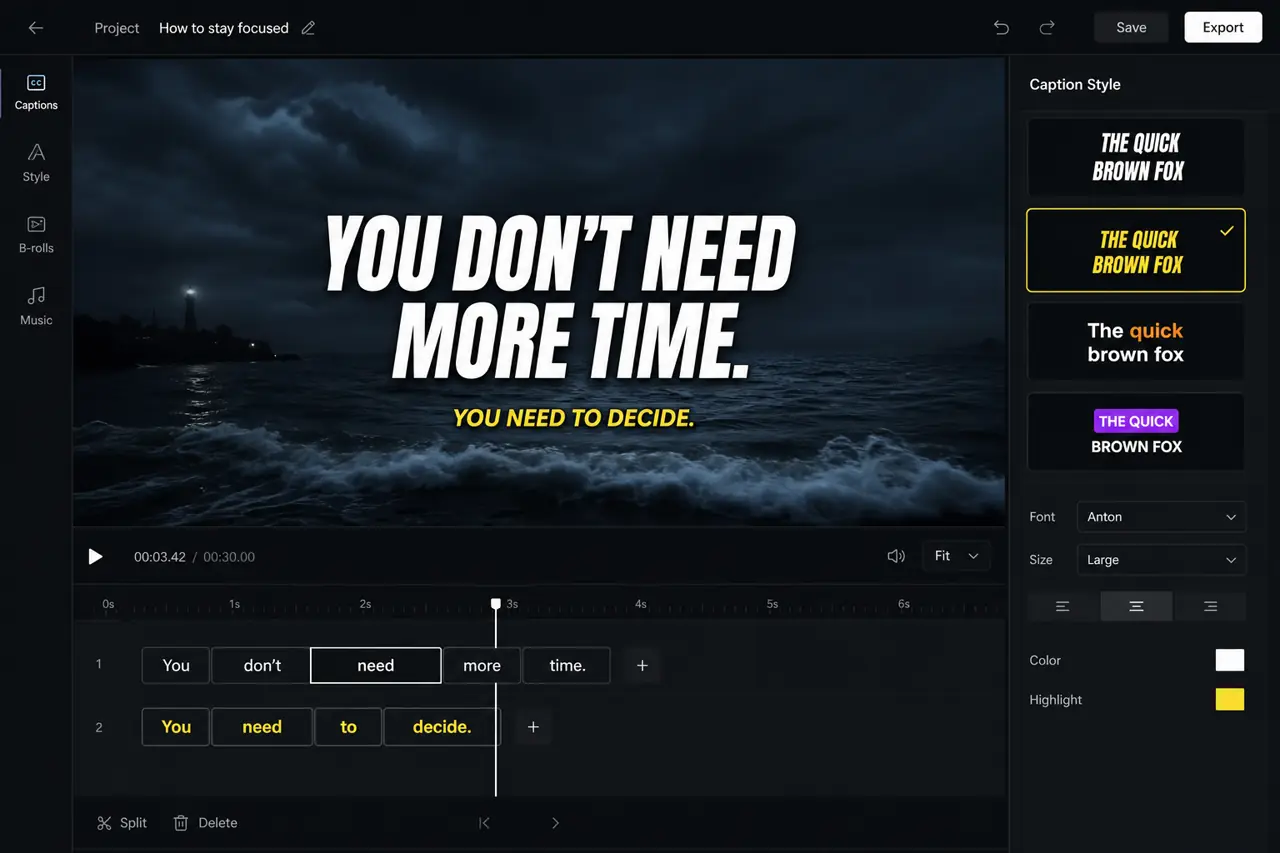
What it is
Submagic is a browser editor built around captions. You upload a clip or paste a YouTube link. It transcribes the audio and burns animated captions onto the video. You fix words and drop silences by editing the transcript, not a timeline.
The same project can also add B-roll, zooms, hook titles, and a publish step to TikTok, Reels, and Shorts. The caption pass is the reason to open it. The rest is extra.
Official site is https://www.submagic.co. The live footer says made in France, copyright 2026.
Who it’s for
Use it if you already have talking-head or voiceover footage and the bottleneck is making captions look native to TikTok and YouTube Shorts. The templates and the text editor are the product.
Do not buy it if you only need plain burned-in text. CapCut already does that for free. Also skip it if your source clips regularly run longer than your plan’s duration cap (2 minutes on Starter, 5 on Pro, 30 on Business). This is not a full NLE. It is not a long-form clipper unless you add Magic Clips.
Standout details
- Official pages claim captions in 123 languages. Accuracy is listed as 99% on the homepage and caption generator page, and 98% on the auto-editor page. Treat that as marketing. You can still edit any word in the transcript.
- Captions are styled and burned in. The auto-editor FAQ also says you can download an SRT, or export a subtitle-only video on a green or blue background.
- Caption styles are customizable (fonts, colors, stroke, position, animation). The caption page says 35+ animation templates in one section and 12+ in the FAQ. Official copy contradicts itself. Custom templates are Pro and Business only, per the official how-to (updated 5 May 2026).
- Text-based trim: delete a sentence in the transcript and the cut follows. The official how-to says caption generation takes about 40 seconds.
- Free trial: 3 short videos, no credit card. Exports carry a watermark until you subscribe (help article updated 29 Oct 2025). The pricing page also shows a Free card at $0 with a watermark, 3 videos per month, and a 200 MB / 1 minute 30 second cap.
- Paid plans are billed per member. Starter: 15 videos per month, 2-minute cap, 1080p at 30 fps, standard captions and stock B-roll, 1 user. Pro: 40 videos, 5-minute cap, Storyblocks B-roll, silence and bad-take removal, caption translation, Brand Kit, publish to TikTok / YouTube / Instagram, up to 3 users. Business + API: 100 videos, 30-minute cap, 4K at 60 fps, custom dictionary, priority render, 100 API minutes per month.
- Magic Clips is a paid add-on ($19 per member per month, or $12 on annual billing) for pulling shorts from long videos. The USD pricing card says 10 long videos per month. Without the add-on, this is a caption-and-polish tool for clips you already cut.
- Upload limits from the help center (updated 5 Apr 2026): 3,000 MB per file. Preferred formats are .mp4 or .mov, H.264 or HEVC. They ask for whole-number frame rates (30 or 60), not 29.97.
- The Business card on the pricing page also flashes a $120/month figure next to $69. The compare table and the official pricing help article (updated 16 Jun 2026) both state Business at $69 per month. Use the help article and the compare table, and check the live page before you pay.
Honest verdict
Try it. Run the three free videos on a real clip before you pay. The caption look and the transcript editor are what you are buying. If those feel faster than CapCut on your footage, Starter or Pro is a fair trade for a daily Shorts cadence. If you only need plain captions, or your clips blow past the duration caps, skip the subscription.